Showing posts with label metallic fx. Show all posts

Thursday, January 29, 2015

The Fifth Thursday

It is the fifth Thursday of the month, so the whole team is playing this week.  Of course, our theme is still birthdays, but I always prefer a nice, all occasion type card for birthdays.  I feel better when I can write in anything I want.
 
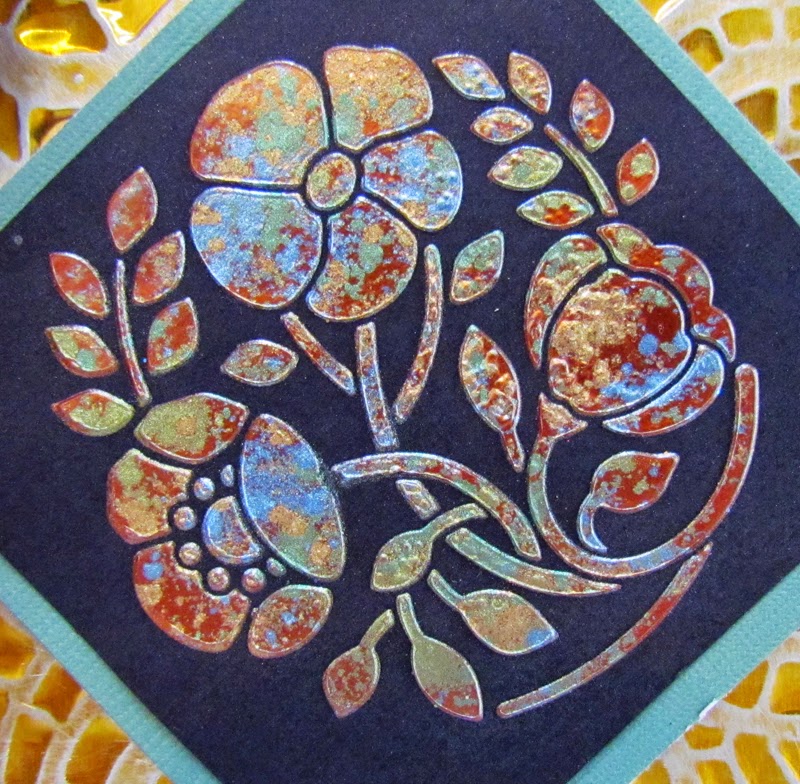
 For this card, I used two different techniques.  First up, I pasted LM2011 Poppy Circle with Metallic Copper Embossing Paste.  While it was still wet, I sprinkled on some Metallic FX in http://www.stencilwithstyle.com/accessories/fxpins.html, FX 10 Kiwi, and FX 17 Navajo Sky.  I let them dry for awhile, but then got a little impatient, and used my heat gun to speed the process.  It caused a few little bubbles on the surface, but I really liked it.  When everything was completely dry, I rubbed off the excess Metallic FX with a Swiffer refill.  Here is a little detail shot:


 While the paste dried, I ran the LJ 901 Mosaic Swirls Stencil through my Cuttlebug with yellow coated aluminum and the Stamping Details Rubber Embossing Mat.  After the embossing, I simply sanded off a little of the gold color.
     With the addition of some May Arts ribbon and a little card stock, I was finished. 
     Thanks for stopping by today. Try making something yourself and upload it to the Dream It Up! Blog for your chance to win a great prize.  For inspiration, be sure and check out the other team members this week at the following links:

Thursday, February 20, 2014

Dreaming of the Tropics

The Dreamweaver challenge for the month of February is "February Flutters", meaning anything that flutters. Heart flutters, wings that flutter, breezes, sails, etc. Link your creations to the Dream It Up! blog for a chance to win the stencil of your choice. 
As for myself, I live in Southeast Michigan, where it is the 3rd snowiest year on record so far.  There are mountains of snow on the edges of parking lots and driveways.  We have also struggled with the "Polar Vortex", which has caused extremely low temperatures.  Yet today, the temperature broke above freezing, for the first time in a LONG time.  Spring began to tease us a little.  It had me dreaming of warmth, of summer, and the tropics, which made me think of this simple little card.

Simple, you wonder?  Why, yes it is.  I pasted the Toucan Stencil LG 752 on white card stock (apparently I did this backwards) and the Jungle Leaves Stencil LJ 825 on white card stock.  I used Matte Black Embossing Paste DMBP on both.  Of course, my pasting supplies included the Paste Spreader LM 2010 and the Removable Tape.  I missed a little spot on the bottom left but, in the end, I thought that it added character.
When the paste was dry, I placed the clean stencil over the top of the pasted area and "painted" with Metallic FX Mica Powders.  I used Goldfinch FX05 on the beak and feet, Kimono Red FX15 on the flower and head, Moonstone FX04 on the neck and belly, Cocoa FX18 on the branches and a combination of Kiwi FX10 and Ivy Garden FX11 on the greenery.  I prefer to apply the colors with my fingers.  I think they go on a little more intensely and I don't mind getting a little messy.  If that bothers you, you can easily apply the colors with a stencil brush or even a cotton swab.  The amazing thing is when you use the matte colored paste, the Mica Powders stay on!  The last step is to add a little black rhinestone to the eyes and assemble the card.
Take a look at the way it shimmers when I hold it sideways:
I hope you liked dreaming of tropical climes with me today.  I heard we will be experiencing another "Polar Vortex" again next week......
I would love it if you could leave me a comment.  Check out the other "A" Team players this week when you get the chance: 


Thursday, July 18, 2013

Summertime, Sparklers and S'more (Dragonflies)

This month's Dreamweaver Challenge is Summertime, Sparklers and S'more.  This week, I was inspired by all the fireflies that seem to surround my house all summer.
I used black coated aluminum by Mercart.  I ran the Hello Stencil LS 96 and Mosaic Swirls LJ 801 through my Cuttlebug.  I sanded the metal to reveal the aluminum.  
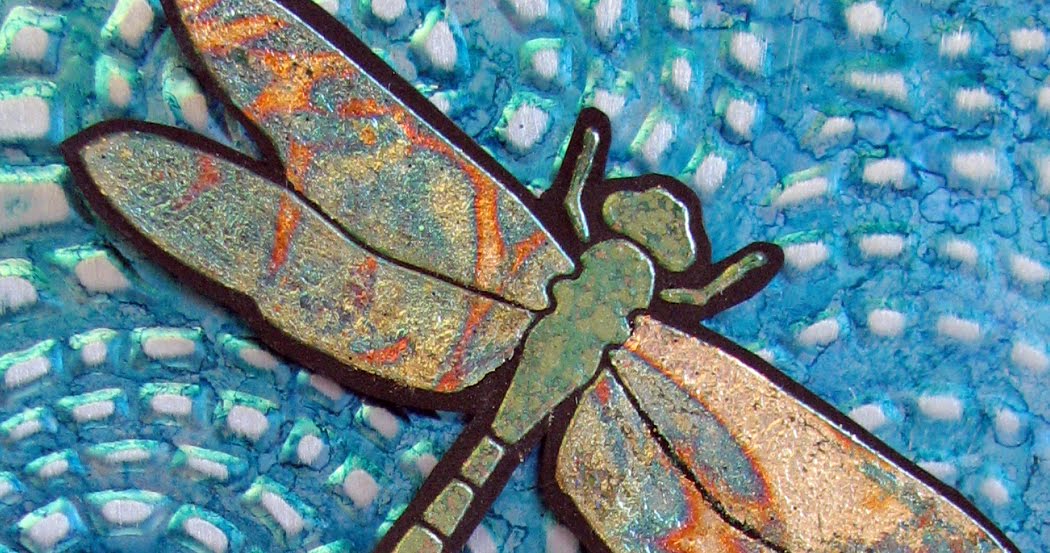
I pasted the Dragonfly Stencil LM 193 with Black Matte Paste.  When it was dry, I used my finger to apply Moonstone Metallic FX, Kiwi Metallic FX and Ivy Garden Metallic FX.  Then, I assembled it with card stock, a gorgeous May Arts ribbon and two rhinestones.
The dragonfly really shimmers.  Here is a closer look:

Now, you should take a look at all the other team members playing today, get inspired, and create something yourself.  Send a picture of your creation to lynell@dreamweaverstencils.com for your chance to win this month's prize.

Thursday, March 7, 2013

A Blooming Spring

This month, we introduce a new theme--A Blooming Spring....So, flowers, right?  This one was fairly simple.  I used two different stencils, LM 2011 Poppy Circle and LS 1010 Small Happy Birthday. I taped them down with Removable Tape. Then, I used the DPK Palette Knife to spread the Gold Embossing Paste onto black card stock.  I removed the stencils and then sprinkled Metallic FX in Kiwi, Ivy Garden, and Eye of the Tiger randomly across the paste and let it dry.  Then, a Swiffer refill was used to remove any excess powder.  A little golden card stock, Graphic 45 paper, gold ribbon and a black card, and I was done!
You should take part in the "Blooming Spring" competition!  Just make a flowery card and send a digital picture to Lynell@dreamweaverstencils.com.  You could win!

Thursday, January 10, 2013

A Resolution Diary

This month's Dreamweaver challenge is A Fresh Start.  My interpretation this week is a take on New Year's Resolutions.  It is a way to keep track of your resolutions, a "Resolution Diary".  Personally, while I enjoy the idea of a new year being a fresh start, I think you should be able to create a new resolution any time of the year.  The biggest problem is the follow through--when do you start?  As an answer to that question, I added the phrase "Now is the Time", to remind me that now is the best time to start a new course of action.

MATERIALS:
Dreamweaver Stencil LX 7018 Steampunk Clock
Dreamweaver Metallic Gold Embossing Paste
Dreamweaver Matte Black Embossing Paste
Removable Tape
LM 2010 Paste Spreader
Small Palette Knife Spreader
Metallic FX in Moonstone, Ivy Garden, Kiwi, Purple Satin and Eye of the Tiger
Heat Gun
Black Cardstock
Parchment Colored Cardstock
Purple Hand Made Paper
Premade Journal
Small Alphabet Stickers
Brads
5" Xyron Machine with Permanent Adhesive Cartridge
We R Memory Keepers Big Bite
Swiffer Refill Cloth
Craft Knife

DIRECTIONS:
1)  Place stencil over a small piece of parchment colored paper and tape down with removable tape.  The cardstock needs to be under the clock portion.
2)  Use small palette knife to spread Matte Black Paste over the clock section.
3)  Remove stencil and wash.  Set pasted clock aside to dry.
4)  Put clean and dry stencil over the black cardstock.  Tape down with removable tape.
5)  Use large paste spreader to spread gold paste over the image.
6)  Remove stencil and set aside to wash.
7)  Use clean and dry palette knife to sprinkle the various colors of Metallic FX over the wet paste.
8)  Carefully flick excess Metallic FX powder off of wet pasted image.
9)  Use heat gun to heat the wet paste until it is bubbly.
10)  After all of the image has been "bubbled", you can use your hand to carefully tap down any areas that remain raised.  This is not necessary, but I believe that it creates a tighter, more reticulated look.
11)  Use the sticker letters to create a sentiment on a small piece of parchment colored cardstock.
12)  Use the craft knife to cut around the outside of the clock face on both pieces.
13)  Tear the edges of the purple paper.
14)  Use the Swiffer refill cloth to gently clean off all the extra Metallic FX powders.
15)  Run all the pieces through the Xyron and assemble.
16)  Use the Big Bite to create holes for the brads.
17)  Place the brads.
You are done.  The Metallic FX causes the work to be even shinier than just the Gold Embossing Paste.  I managed to capture that shimmer in one of my pictures.  This is what it looks like:
So now you may be working on some new resolutions.  May I suggest one?  Enter some competitions, you have nothing to lose.  Of course, I would suggest first entering the Dreamweaver Fresh Start Challenge.  Just make something that means "Fresh Start" to you, and send a picture of it to Lynell@Dreamweaverstencils.com.  You could be featured on the Dreamweaver Blog and possibly even win $25 woth of Dreamweaver products of your chosing!  Give it a shot.  After all, "Now is the Time"......

Thursday, October 4, 2012

A Festively Fall October!

This is the first Thursday of October, and it marks a new challenge at Dreamweaver Stencils.  It is "Festively Fall" month!  This first week, I am featuring something I almost never post--a paste project.  Let me show you how it is done.
MATERIALS:
Dreamweaver Stencils LL 3015 Raven Vane
Dreamweaver Stencils LG 616 Leaf Texture
Dreamweaver Matte Black Embossing Paste
Removable Tape
Dreamweaver Paste Spreader LM 2010
Dreamweaver Metallic FX in Purple Satin
Distress Ink in Peeled Paint
Distress Ink in Spiced Marigold
Distress Ink in Mustard Seed
Distress Ink in Barn Door
Distress Ink in Aged Mahogany
Distress Ink in Tea Dye
Three Dreamweaver Gold Handled Brushes
Inkssentials Blending Tool with Foam
Inkssetials Non Stick Craft Sheet
Paper Towel
Cardstock in Ivory, Green, Black and Kraft
DIRECTIONS:
1)  Tape the leaf texture background stencil onto the ivory cardstock and the craft sheet.  You only need one piece of removable tape for this.
2)  Use your gold handled brushes to stencil the color from the Distress Ink onto the cardstock.  You will pick up color with the brush from the ink, tap a little off on the paper towel, and swirl it over the leaves.  I love Distress Ink here because it blends well and comes out of the brushes easily.  I suggest three brushes, because one should be used in the yellow, one in the reds and the last in the green.
3)  After you get the leaves the way you like them, remove the stencil.
4)  Now, use your blending tool and the Tea Dye Distress Ink to distress the leaf cardstock.  You will have the foam pad on the blending tool.  Tap it into the ink and, starting on the craft sheet, blend the color into the cardstock, moving the tool in a circular motion.
5)  You can flick water onto the cardstock if you like, to make an even more distressed look.  Wait until it is completely dry before proceeding to the next step.
6)  Place the raven vane on top of the background and tape with the removable tape all the way around.
7)  Place the Matte Black Embossing Paste onto the spreader.
8)  Put the spreader on top of the stencil and pull down, as if you are squeegeeing the stencil.
9)  Carefully remove the stencil, using the last piece of tape as a hinge to lift the stencil.
10)  Let dry.
11)  Dip a finger into the Metallic FX and rub around the bird to create highlights.
12)  Assemble card.

Okay, I am done, now it is your turn.  Make something "Festively Fall", upload it and link it to the Dream It Up! blog OR you can email a photo to Lynell@dreamweaverstencils.com.  Join in the fun for a chance to win your choice of stencil!

Thursday, April 26, 2012

Two Flower Cards With One Terrific Stencil

This is the last post for the Dreamweaver Flowers Challenge, and I had a little dilemma.  I had two cards with one of my FAVORITE stencils (LL 3023 Tall Poppy) and couldn't decide which to post.  So, I decided to post both of them.  Two techniques with the same stencil and even the same colors.  Here is how they are done.
CARD 1:  The Metal Look
1)  Run the stencil LL 3023 through your manual die cutting machine with Mercart Green Coated Aluminum.  You are DEBOSSING, so the metal goes on top of the stencil with the green side up.  Here is my Cuttlebug sandwich:  Plate A, Plate B, Stencil face up, Metal green side up, Dreamweaver Details Embossing Mat, Plate B.  Leave the metal on the stencil and set aside.
2) Follow step one again, but with white cardstock (spritzed lightly with rubbing alcohol on the back) and Stencil LX 7002 Plaid.  Be careful to run this one through with the stripes perpendicular to the opening and right in the middle of the plate.  This one will sometimes bend if you are not careful.
3) Go back to the metal piece.  Use a Mercart Double Teflon Tool to refine the interior edges of the metal, pressing them against the stencil.  Use a couple of drops of Alcohol or Alcohol Blending Solution inside the main parts of the flower to remove the green from those areas.  Dab lightly with a paper towel.
4)  Drop Alcohol Inks into the wells that should be relatively clean of the green.  Use whatever colors you like.  Let dry for a few moments.  With the stencil still attached, sand all the color from the background. 
5)  Assemble the card.

CARD 2: Foils and Metallic
1)  Place Stencil LL 3023 Tall Poppies on a piece of ivory cardstock.  Tape down with removable tape all the way around the stencil.
2)  Using the Paste Spreader LM 2010 and the Green Glossy Embossing Paste, emboss the image. 
3)  Remove the stencil and sprinkle with Metallic FX in 10 Kiwi and 11 Ivy Garden.  Set aside to dry.  Do NOT wipe clean until it is completely dry.
4)  Soap the back of the Thank You Stencil LS 1009 to create a resist.  I use the Dreamweaver Handmade Hawaiian Soap because I can just apply it dry and do not have to adjust the amount of water that I add. 
5)  Brush the "Crumblies" off of the stencil (this part you will know when you see).  Attach to the Double Sided Adhesive Paper soaped side down.
6)  Pour glitter on the words.  I used Art Institute Glitter in Microfine 500 Ruby Red.  I love using the Microfine Glitter on detailed portions, because it makes them look so beautifully crisp.  Rub it in with your finger, then use a large, clean stencil brush to remove any excess glitter.  Brush it a couple of times just to be sure.
7)  Place the whole thing stencil side down and carefully remove the adhesive paper from the stencil.  Leave the stencil on a flat surface and walk your fingers along it to make sure that the stencil lays flat.
8) Pour glitter over the top.  I used Art Institute Ultrafine Transparent in 197 Flax, which created a lovely light ecru color.
9)  When the paste is dry, rub it with a Swiffer Refill Sheet to remove all of the excess Metallic FX Powder.
10)  Place glue over the parts that you want to be red.  You should apply it lightly and carefully.  I used Art Institute Designer Dries Clear Glue with the Ultrafine Metal Tip.  Wait for it to dry until it looks clear.
11)  Once glue is clear and still tacky, place red Stampee Foil over the top of it.  Be sure to lay it dull side down.  Give it a slight rub and pull it off.
12)  Squeeze Buttercup Liquid Pearls on top of the seed area of the flower.  Let dry.
13)   Assemble the card.
Both cards done!  Which was your favorite?  I am not sure which I like better.  I can tell you though that you should definitely enter the Dreamweaver Flowers Challenge.  You have until the end of the month to make a floral card and post it somewhere online.  Then, just link it to the Mr. Linky in the Dream It Up Blog.  Too complicated?  Email a picture.  You can find the info on that blog as well.  If you do, you are eligible to win wonderful stencilling prizes! 
In the meantime, check out the other blogs this week.  Also, if you scroll down a little, you will find the Connie Crystal Post which also uses a Dreamweaver Stencil AND last week's post which was scheduled to go on time, but somehow got messed up by Blogger.  Get inspired.  Enter the flower competition.  You have nothing to lose!

Thursday, February 9, 2012

A Little Scottish Influence

Alright, so I know that the challenge this month is actually St. Patrick's Day, but I felt that it would be a great time to give a shout out to the Scots, with the beautiful Long Thistle Stencil LL 3001. Of course, I DID use green, and since that is another option in the challenge, it counts! That's right...you can use something green for your challenge post as well. Anything green. Then, you should link it over to the Dreamweaver Blog for your chance to win these stencils.

But I digress. Back to this week's post. I made this card with a wonderful group of women at Altered Art Addicts in Jackson, MI last weekend. Here is how it's done:
1) Paste the stencil LL 3001 using Green Glossy Embossing Paste on cream colored linen.
2) Let paste dry
3) Gently apply wet glue with a regular paintbrush. The glue should be about the consistency of milk. I used watered down Art Glitter Dries Clear Glue.
4) Let the glue dry until it is tacky and clear. There should not be any "pools" of glue.
5) Apply Metallic FX in Plum Royale, Purple Satin, Kiwi and Ivy Garden. Use this technique: dip a stencil brush into the pot of Metallic FX. Tap it lightly on a piece of paper towel to remove any excess. Then, tap the color into place on the paste.
Don't forget that you can always use a Picasso stencil to mask out areas if you want a precision look with exact shading of the different colors.
That's it. Just five steps! Me? Yep. I love the colors and shine of the Metallic FX. Sometimes less is, indeed, more. But don't quote me on that!
So, are you inspired yet? If not, go check out the rest of the Dreamweaver Team sites. They are listed to the left of this post. Then, get inspired, make a little something St. Patrick's Day, or just green. Post it anywhere online. (I think you can even do Flickr if you don't have a blog). Then, link it with the Mr. Linky at the bottom of the Dreamweaver Stencils blog. As simple as that, and you could win the beautiful, springy stencils above. (I don't even have those two, and I am really digging on that Long Lily one.)
Come play with us and have some fun. By the way, I am feeling a little inspired myself today. I am thinking that you might find something REALLY different here next week, if I have a little time to work on it..... See you next week!

Thursday, December 22, 2011

A Burgundy and Gold Dreamweaver Christmas

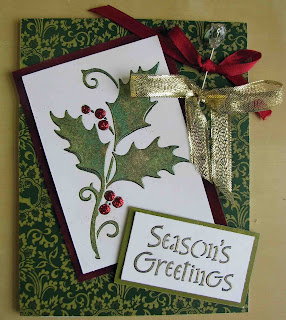
This week's challenge was burgundy and gold. I knew from the start which stencils I would be using--two of my favorite Christmas ones--I just didn't realize that I was going to be sassy and add a little green until yesterday. This particular holly was created as a sample pasting during a class. I used the Holly and Swirls Stencil LL 3005. The paste was the Green Glossy Embossing Paste and, as part of the demonstration, I sprinkled on Ivy Garden and Kiwi Metallic FX. Once the paste was dry, I used a Swiffer to remove the excess powder. I found the sample later when rummaging for the stencil, and it was just so pretty with the Metallic FX that I decided to use it, despite the burgundy and gold mandate. I also used the Metallic FX, in Goldfinch and Gold Dust on the Metallic Gold Embossing Paste for the word. I used the Christmas Stencil LL 3009 for that one.

The only other stencil that I used was the Plaid Stencil LX 7002. This was used with velvet paper and my Cuttlebug Machine. I just ran the stencil through the machine with the velvet paper and a rubber embossing mat. The actual color of the paper is almost identical to the cardstock, but velvet paper does not photograph very well, so there is a slight color shift. The berries are Queen and Company pearls, and almost an exact match as well. I raised the holly up just a little with 3D Dots and added a gold mat and ribbon. I was very pleased with the results. Here is another photo of the card. It shows the raised holly, dimension on the pearls and shimmer on the word just a little better than the previous picture.
So, Merry Christmas all, and a hearty "welcome" to the newest design team members, Cherylynn and Cyndi! I didn't have Cherylynn's blog info yet, but link on over to Cyndi's blog and check it out when you get the chance. Don't forget to check out all of the other Dream Team blogs, get inspired, and leave a comment if you can--we all like comments!

Wednesday, August 24, 2011

Thursday Dream Schemes--Free Week


First off, let me tell you what is happening next week. The Dreamweaver Team is going to be blog hopping with the folks from Woodware UK. Yep, that's right. It is the WONDERFUL people that I worked with when I went to the UK for Lynell. I am so excited that I signed up for at least two days. I believe that I am first hopping on Monday or Tuesday, so stop by early next week and get in on this. This, by the way, is a NON CARD blog hop! I have a couple of cute things in store.

Anyway, on to this week. I am particularly proud of this one. I like to think of it as four ways to use a metallic effect. Here it is:

So, on to why I think of this one as metallic four ways:

1) The sentiment is done with metallic gold embossing paste. It tells a tale on me--I don't always use tape all the way around. That was the case with this one, stencil LM 146 Thinking of you. You can see the paste that went over the edge of the stencil on the top and the bottom. Usually, I trim this off and no one is the wiser. I liked the little borders in this case, so I left them on.

2) The metal on the background was run through the Cuttlebug with a rubber mat and stencil LJ 901 Mosaic Swirls. Then, it was colored using alcohol inks and sanded to enhance the detail.

3) The dragonfly (stencil LM 193) and wings were both pasted with glossy green embossing paste. The body of the dragonfly was made by sprinkling Metallic FX in Kiwi, Ivy and Goldfinch on the paste while it was still wet. After it all dried, I brushed off the excess and then used a Swiffer cloth to get it really clean.

4) After all the green paste was dry, I covered the wings with glue and let it dry until it was tacky, but not completely dry. Then, I used Green Leaf over it. I noticed that the glue did not seem dry enough (but, of course, only AFTER I laid the gold leaf over it). At this point, I dried it with my heat gun. As the glue under the foil dried, it bubbled, raising the foil. When I pulled the heat gun away, it fell into a bit of a wrinkly heap. This was wonderful, and created a slightly reticulated look. It seemed to me to appear more "insecty" and was a true happy accident.

Now that you have seen what I had to show you, go around to the other Dreamweaver blogs and check them all out. Then, post something of your own. With no regular challenge this week, it should be easy to do. Link it to the Dreamweaver Blog, leave a comment for us, have fun, and just participate. Be sure to check back next week for a wonderful, non-card hop!

Thursday, August 18, 2011

Thursday Dream Schemes--Red, Ivory and Kraft

This week's challenge is red, ivory and kraft. When I looked through my work, I found one that was very close--red, ivory and brown. I decided to remake it, with only a slight change in products and colors. Here it is--red, ivory and kraft two ways. Both cards use stencil LJ906. The top card, which is the newer one, also uses the new LS1008. It is a Chinese character for the word Hope.
The two different cards both used Red Glossy Paste. It was applied the same way, but the technique varied after the application. The top card had Art Glitter in Ultrafine Red Velvet, Christmas Red and Chunky Holographic Red Rocket thrown on the wet paste and brushed off when the paste was dry. On the bottom card, I used the Metallic FX in Cocoa, Amber Glow and Kimono Red. It was also brushed off when dry, but then I used a Swiffer to remove all the excess.You might be able to see on this bottom card, but on both I scraped off the covering to expose the beautiful Red Glossy Paste underneath. See how the edges on this one appear drawn on? In real life, it is bright red on those edges. I did the same on parts of the top one, but being that that has red glitter on it, it shows up a little less bright.
These cards were actually very simple. Not much to do beyond the pasting and assembly. I hope you like them. Check out the rest of the team's reaction to this colorway. Leave a comment. If you want to try it, link yours to the Dreamweaver Stencils blog. Come play with us!

Thursday, July 28, 2011

Dreamweaver Free Week--My CHA Badge

Three years ago, the store that I work at was about to open its doors. Sadly, it is about to close, exactly three years from its opening date. I will never forget all the buzz that was generated by my new bosses, fresh off of their first CHA (Craft and Hobby Association Conference). They were back with stories about fantastic new products, exciting ideas and enthusiasm to spare. I remember how they hung the badge holders that they had recieved from Crafters' Home over their respective desks. To me, those badge holders represented excitement. Indeed, ever since my first CHA, I had been thinking about making myself a badge holder. Once I became part of the Dreamweaver Design Team, I knew exactly what I would make it out of.It took me some time to decide which techniques to use on my Dreamweaver CHA Badge holder. I wound up with four different materials and five different techniques.First, I sprayed a 5 1/2" x 10" piece of Claudine Helmuth Sticky Backed Canvas with Adirondack Color Wash in Stream. I let that dry before I pasted, starting about about 1" down from the top with Translucent Paste and the LJ 901 Mosaic Swirls stencil. After that dried, I used a little bit of Black Soot Distress inks around the sides of the paste. When that was dry, I cut a roughly 3 3/4" by 2 3/4" square from the center of the pasting.
In case you are interested in the assembly, I lined the inside with a cotton fabric placed on the sticky backed canvas, leaving about 1/2" on each side to stick to the edging of the back piece. I evenly spaced five eyelets under the pasted portion. Then, I folded the back up so that the edges met the edges of the top, sticking the front to the back, and making the pouch with an approximate 1" flap on the front top portion. I then ran the LJ 901 stencil with Lifestyle Crafts Sticky Backed Metal through my Cuttlebug, colored it with Alcohol Inks and sanded it. I put it on the back side of the pouch to reinforce it a little. I used bias tape and a really horrible hand stitching to encase the raw, stuck together edges. Then, I inserted two eyelets on the top.


The beading was created with blue wire and some beads. I also created a couple of charms. They were made with Dreamweaver Stencils LS6 Scallop and LS 71 Small Conch. I put a little vegetable oil on the back of the stencils and pressed them lightly into flattened dark blue polymer clay. Then, they were rolled down with a brayer until the clay extended just a little over the stencil. I dipped my finger in Moonstone Metallic FX and lightly rubbed it into the clay with the stencil still in place. Then, I added just a little shading with my finger and the Metallic FX in Cocoa. Lastly, I peeled the clay from the stencil, trimmed and gently shaped it with my finger, added two holes, and baked it according to the instructions on the label.

The metal pieces were really interesting. They were made in two similar, but different ways: metal embossing and debossing. The seahorse LM 181 (in pink covered aluminum) and the turtle LM 179 (in green aluminum) were embossed with the Mercart Metal Embossing kit. Using the same kit and brown coated aluminum, I debossed the sand dollar LR 12. The difference lies in where you hold the stencil and the relative placement of the metal. For the embossing, I placed the stencil face down on my table and put the metal over the top of it, pushing it into the holes on the stencil. Then, I removed the stencil, flipped over the image and sanded it lightly. For the debossing, I laid my stencil face up, and put my metal over the top, pushing into the crevices. Then, I "poufed" up the metal around the outside and sanded it. The metal colors show in the portion that is the furthest back. All three of the metal pieces were filled in the back with the Mercart filler.


Now, on to the fun Shrink Plastic Charms. I used the matte finish Shrinky Dinks. I sanded the area that I was planning to use. Then, I covered it with Adirondack Snow Cap Pigment Ink. When it dried, I taped the stencils LM 181 Seahorse, LM 179 Sea Turtle, LR 12 Sand Dollar, LL 371 Humu Humu and LL 372 Kihi Kihi down and, using Adorondack Pigment ink, I colored the images. I cut around the outside of them and punched holes in the top with the largest hole punch on my Big Bite. Finally, I shrunk them with my Heat It tool.
I had so much fun creating this badge holder, and even more fun wearing it at CHA. I wanted to show it to everyone this week to bring my excitement from CHA to you, just the way my bosses did three years ago. I also wanted to show you something that wasn't a card. I realize that you may never make or need a badge holder, but Dreamweaver Stencils can be used to create anything. I hope you get inspired by what I did, or by what a team mate has done. If you do, leave a comment. Then create something and link it to the Dreamweaver Blog. We would love to see it. Inspire us!

Thursday, February 24, 2011

Thursday Dream Schemes--Sketch Challenge


Here is this week's challenge sketch. I don't know why, but when I first saw it, I thought of the Honeycomb Stencil LJ 806. I just couldn't get that thought out of my mind, no matter how much I tried. I just couldn't figure out how I wanted to execute it. Then, I went to CHA and met a wonderful Australian lady named Julie Makela. She showed us a technique with Stampee Crafts foil that was PERFECT.


First, you emboss the image, either traditionally or with a machine. (I chose traditionally).


Then, you use pigment ink to stencil the image. (I used Adirondack in two colors of yellow).


While the ink is still wet, pour the powdered glue on it, and heat. It can't overheat, nor does it matter if it is a little undercooked at this point, so there is no pressure.


You then place the foil over the top of the image, and send it through a thermal laminator. I used the transparent color Cracked Ice and just purchased the laminator at Target for under $30.


Finally, you let the image cool a little and then pull the foil off quickly, in one fell swoop. (Think Bandaid).


This was REALLY easy, and just look at the beautiful results. Even more stunning in person, this honeycomb sparkles in holographic colors when hit by the sun.
So, then I began to think about the details. Bees were an obvious choice. I looked for the extra bees that I used on the card that I had published. (Stampers' Sampler Dec/Jan 2010-2011--shameless plug!). Not finding them (of course), I decided to recreate them. This is how I did it:
I conditioned and rolled out black polymer clay.
I used bee stamp (by the now defunct Cornish Heritage Farms), to press the design into the clay.
I cut around the bee with a craft knife.
I rubbed a little Moonstone Metallic FX onto the wings with my finger.
Then, I baked the bees according to the polymer clay instructions.
After the clay cooled, I glued yellow flock into the stripes using Art Institute Glue and added Purple Stickles to the eyes.
Then, it was time for assembly. I used My Mind's Eye paper, dark teal cardstock, and a stamp by Cornish Heritage Farms. I attached the bees with Glue Dots.
I was very happy with this card, which I promptly gave to my aunt--whose husband keeps bees!

Thursday, January 13, 2011

Thursday Dream Schemes--Sketch Challenge

SNEEK PEEK ALERT


This week, the Dream Team has chosen a sketch challenge. I was inspired by the large shape, which reminded me of a slider. That was the inspiration for my project.


In this post, the card sketch was changed a little. First off, it was turned on its side. I took the ribbon slide idea that I had to the extreme, making two slides. The sentiment has been enlarged and moved up.


The image is a little darker than it the project is in real life. The color that appears almost black in the photo is actually a burgundy color. The background is the new, SOON TO BE RELEASED stripes. It was pasted with Pearlescent on a textured white surface. The paste is very shiny and takes on a slight gold cast next to the metallic cardstock.


The sliders were created with a light ivory polymer clay. First, I kneaded it for a while, then brayered it onto a piece of aluminum foil until it was smooth and even. I added a light coating of vegetable oil on the back of the stencil. (The oil allows the stencil to release easier from the sticky clay.) Then, I placed the stencil over the clay and brayered again until the clay pushed upwards, slightly over the stencil in the openings. After that, it was merely a matter of choosing the Metallic FX color that I wanted (I used Goldfinch, Rose Berry and Cocoa) and rubbing then gently on the exposed surface. I removed the stencil and cut around the image with a craft knife. Then, I added the holes that would make these projects into ribbon slides. I left them on aluminum foil and baked them at 275 for 18 minutes, according to my package instructions.


The Metallic FX colors turned out lighter, softer and shinier than they appear in this photograph. Here is another close up to give you a feel for the card. This is a fun, and relatively easy way to use your stencils and Metallic FX.

Saturday, October 2, 2010

BLOG HOP


WHAT IT IS/HOW TO WIN


Here it is, our Dream Team Blog Hop. This is my very first Blog Hop, so bear with me. For three days, October 1-3, the Dream Team members will be posting new samples and card information. You need to comment on EACH member blog to qualify for the most fantastic free prizes. You can win YOUR favorite stencil, paste and Metallic FX color. Remember, comment on EVERY blog for the most chances to win. Become a follower of the Dreamweaver stencil blog here for an extra chance. After leaving your comments, go to the Dreamweaver Stencil site and choose your favorite stencil. Tell us why it is your favorite or how you would use it, and you can win it. Check back on the blogs October 4th to find out if you are the winner picked by random.org for that site.


DAY 2


This is the beginning of day 2. For a look at DAY 1, start with Deborah's blog here. Okay, so on to my goodies.

I am calling today METALLIC FX MADNESS DAY for my blog, anyway.

First Technique: Metallic FX on paste.


This peacock card was created using Peacock Stencil LG 730 and Feather Stencil LJ 840. I pasted the feathers on blue cardstock with Glossy Black paste and threw Metallic FX powders in Ivy, Kiwi, Navajo Sky and Glacier on it while the paste was still wet. I did the same with the peacock design on acetate. When they were dry, I used a Swiffer sheet to wipe off the excess. I then decorated the top with black Art Glitter and rhinestones. I put vellum behind it and laced ribbon up the side. I wish the photographs could do the beautiful Metallic FX powders justice!


This next card was done using the same techniques with the Holly and Swirls LL 3005 and Seasons Greetings LS 91. Using the Glossy Black Paste really made the Kiwi and Ivy Metallic FX powders stand out, even on the white cardstock. This card will be featured as one of 5 in my next Dreamweaver Card Class at Scraptales in Brighton, Michigan. (They also have a large selection of Dreamweaver Stencils and supplies in stock.) Check out the website for further class information here.


Second Technique: Metallic FX on Double Sided Tape

Okay, I had to work a little for this one, but I finally have it down to an EASY technique.


First, cut the Dreamweaver Double Sided Mounting paper to size. Then, rub soap on the back of the Candy Cane Stencil LL 555. You need to do this so that the stencil will be able to be removed easily from the backing without bending. Then, use the removable tape to mask out the ribbon. This is very important, because once the Metallic FX powders go down on the backing paper, you cannot attach anything else to them. When the ribbon is masked off, rub a little Metallic FX in Kimono Red on the candy cane with your finger (otherwise known as the very important crafting tool.) I find that the finger works best because you can really get into the nooks and crannies. Gently flick the stencil from behind several times with the stencil face down to remove as much of the powder as possible. Then, use a damp cloth over the stencil to remove the additional powder. Remove the tape and color the ribbon using 3 different colors of green flocking. I used the Picasso Stencil LL 332 to mask off the areas I wasn't currently putting flocking on. (It is probably the ugliest AND most useful stencil you will ever own.) Press the flocking onto the mounting paper with some pressure, as that is the best way to make it stick. Then, roll off the excess. Flick it and REALLY get the extra flocking off. Put stencil face down on a table and CAREFULLY remove the mounting paper. Pour white Art Glitter over the top of the whole thing. Apply to card.
What I like the most about this technique is how the FX powders are beautifully shimmery, but have an almost antique look about them, making a nice contrast with the flock and the glitter.
The Celebrate Stencil LM 283 was done with the first technique.


Now, the last technique: Metallic FX on Polymer Clay


For best results, use black polymer clay. Play with it then roll it out with your brayer and smush it several times until it rolls out smoothly. Put a little olive oil on the back of your stencil and press it into the clay. Brayer over the top a couple of times until the clay raises a little above the stencil. The Christmas one was made with Happy Holidays LM 139, Three Deer LL 467 (backwards, as it turns out) and Metallic FX in Gold Dust, Eye of the Tiger, Ivy, Kiwi and Kimono Red. The Iris (I am thinking about making it a bookmark) was done with Bearded Iris Stencil LL 516 and Metallic FX powders in Purple Satin, Plum Royale, Sapphire, Moonstone, Kiwi and Ivy. I also added a little yellow flocking with Zig Squeeze N Roll Glue.


Well, MY post is finally over. Just in case you can't tell, Metallic FX is one of my newest obsessions. I hope you learned enough here to make it one of yours, too. Comment below to win your favorite goodies. Then, go to Lee's Blog to continue your hopping.


GOOD LUCK AND HAPPY HOPPING!